

replacement laptop batteries
replacement laptop batteries
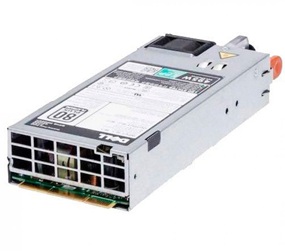

Brand new For Dell R530 R630 R730 R830 2FR04 E495E-S1 495W Power Supply 9338D 09338D.All power supplies are tested by our in house technicians and they are guaranteed to function properly.
495W EPP 80 Plus Platinum Power Supply for Dell Poweredge T430 T330 R630 R730
MAX. OUTPUT POWER: 495W
AC INPUT
100-240V ~ 50/60Hz
MAX AC CURRENT 6.5A-3.0A
DC OUTPUT
+12.2V = 40.57A MAX
+12Vsb = 3.0A MAX
Dimensions
86mm x 38mm x 196mm
Dell PN: 2FR04
Model: D495E-S1
REF NO: DPS-495BB A
Connectors
(1) Hot-Plug
Fully compatible with PowerEdge R430, R530, R630, R730, R730XD, T430, T630 rack & tower servers.
1.Remove the dead pc power supply Once you've disconnected all the leads, look at the rear of the case and find the three or four screws holding the power supply in place. Remove them, then gently lift out the PS, making sure that the cabling doesn't get tangled on, say, a RAM module or expansion card and accidentally pull it loose.
2. Install the new dell 2FR04 Pc power supply Out with the old, in with the new. Make sure the replacement Pc power supply is set to the correct voltage. Once the old PS is out, put the new one in its place and screw it in. Now just reverse the steps you performed: connect the leads to their respective outlets, replace any extracted components, and consult your photos to make sure you've left no lead unplugged. (You'd be surprised how easy it is to forget, say, the DVD lead, especially when you've spent 10 minutes trying to wedge in that pesky front-panel lead.)
3. Fire it up Before you close up the case, make sure everything works. Connect the power cord to the Pc power supply, plug in your monitor and keyboard, and fire up the machine. Unless you've failed to connect the main leads to the motherboard, it should come right to life, just like before. Let it boot completely, then check to make sure there's power to the optical drive(s) and, if applicable, the front panel.
©2012-2025. www.laptopadaptershop.com.au All offers and prices are subject to change without prior notice.Designated trademarks and brands are the property of their respective owners.