

For Lenovo Laptop Battery
For Lenovo Laptop Battery
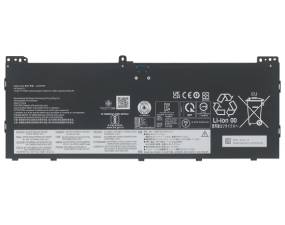

Brand new 70Wh L24D4PK5 L24M4PK5 Laptop Battery For Lenovo Yoga 7 2-in-1 14AKP10/IdeaPad Slim 5 15ARP10. Every L24D4PK5 battery has passed factory testing, grade A cells ensure fast charges and low power consumption, built-in circuit protection ensures both safety and stability. CE / FCC / RoHS Certified for safety.
Quality Lenovo L24D4PK5 70Wh 15.48V Battery – 100% compatible with your laptop, identical size, including all safety measures.
Compatible Part Number::
L24D4PK5
L24M4PK5
SB11Q02023 SB11Q02021 SB11Q02054 SB11Q02058 SB11Q02050
Guaranteed to work on the following model:
Lenovo IdeaPad S Series netbooks
IdeaPad Slim 5 15ARP10 - 83J3CTO1WW
Lenovo Yoga Series laptops (IdeaPad)
Yoga 7 2-in-1 14AKP10 - 83JR000SAU
Yoga 7 2-in-1 14AKP10 - 83JR001EIN
Yoga 7 2-in-1 14AKP10 - 83JR0040AU
Yoga 7 2-in-1 14AKP10 - 83JR0041AU
Yoga 7 2-in-1 14AKP10 - 83JR0042AU
Yoga 7 2-in-1 14AKP10 - 83JR0045AU
Yoga 7 2-in-1 14AKP10 - 83JR007UAU
Yoga 7 2-in-1 14AKP10 - 83JRCTO1WW
Yoga 7 2-in-1 14AKP10 - 83JRCTR1WW
Yoga 7 2-in-1 16AKP10 - 83JU0003US
Yoga 7 2-in-1 16AKP10 - 83JU0004US
Yoga Slim 7 14AKP10 - 83JY000KAU
Yoga Slim 7 14AKP10 - 83JY000NAU
Yoga Slim 7 14AKP10 - 83JY005BAU
Yoga Slim 7 14AKP10 - 83JY006WAU
Yoga Slim 7 14AKP10 - 83JYCTO1WW
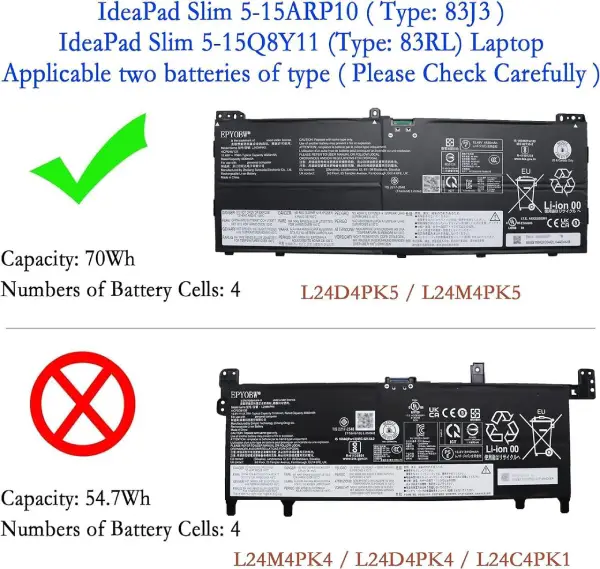
This Lenovo L24D4PK5 15.48V 70Wh Battery was made in accordance with original battery specifications, Certified by international standards, this battery offers a reliable and high-quality replacement option. Buy with confidence knowing that you're getting a product that will keep your device running smoothly.
1.Firstly, turn off the laptop. Be sure that the laptop is not connected to a charging slot and is shut down before you start.
2.Secondly, disconnect the connection that is between the motherboard and the old battery. This will ensure that there is no accident during disassembly.
3.Next, remove the battery first. Unscrew it very slowly and cautiously.
4.Lastly, connect the new Lenovo L24D4PK5 Laptop Battery carefully to the motherboard.
©2012-2025. www.laptopadaptershop.com.au All offers and prices are subject to change without prior notice.Designated trademarks and brands are the property of their respective owners.