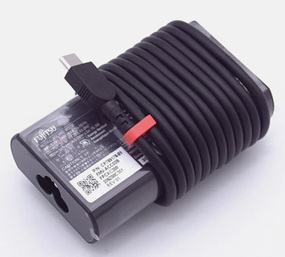

Home :: For Fujitsu Laptop AC Adapter :: Replacement For Fujitsu ADLX65YSCC2F AC Adapter

New Replacement For Fujitsu ADLX65YSCC2F 20V 3.25A 65W AC Power Adapter With Power Cord

Replacement For Fujitsu ADLX65YSCC2F Adapter is rated at 20V 3.25A 65W.The high quality laptop charger for Fujitsu ADLX65YSCC2F provides your laptop with safe and reliable power.It is over Charge protection, Voltage protection, Temperature protection, Short circuit protection, enjoys 1-Year Warranty,60-Day Money Back!

AC Adapter For Fujitsu ADLX65YSCC2F

Brand New Replacement 65W 20V 3.25A Fujitsu ADLX65YSCC2F AC Adapter/Power Supply/Charger With Laptop Cord.


  • Input: AC100-240V
  • Output: DC20V 3.25A
  • Power: 65W
  • Connecter size: TYPE-C
  • Item Includes: AC Adapter and Power Cord For Your Country

Our Price : AU$
  • Qty:

  • Availability: In stock
  • Condition: Brand New
  • Warranty: 1-Year Warranty | 60-Day Money Back
  • Compatible Brand:For Fujitsu
  • Condition:Brand New 100% OEM compatible
  • Certification:CE FCC ROHS

Product Details

This is a New Rpelacement Fujitsu ADLX65YSCC2F AC Adapter Power Supply for the following Fujitsu notebooks / laptops:
Fujitsu LifeBook Series: U9311, U9312, U9313
Fujitsu Ultra-light Portables: UH-X/H1, UH-X/G2, UH75/F3
Fujitsu Mobile PCs: FMV LOOX 90/G, FMV LOOX 75/G

See the Label on the bottom of your Laptop to determine which AC Adapter your Laptop uses.
The Fujitsu ADLX65YSCC2F Charger is also Compatible Part Numbers:ADLX65YSCC2F ADLX65YSCC3F

Features:

The Adapter is a 65W rated power supply and replaces Fujitsu ADLX65YSCC2F laptop charger. Designed to meet Fujitsu's original specifications. The Replacement Fujitsu AC Adapter is designed to be 100% manufacturer compatible and will meet OEM specifications.

  1. Brand new Fujitsu ADLX65YSCC2F Adapter
  2. Original standard designed
  3. Approved:CE,FCC,RoHS
  4. Test:Temperature test; Vibration test; Drop-Test;Over charging and discharging test
  5. Smart device surge protection ,OVP ,OCP ,SCP
  6. Strong built for heavy duty and long usage performance
  7. Triple tests before packing ensure the reliable quality

AC Adapter safety and usage tips.

Here are some tips for better maintenance of AC Adapter.

  1. Always put first the DC output plug into the laptop's power jack before putting the input plug on the power outlet. This is the correct method.
  2. Switch off the Laptop AC power adapters when you are not using the laptop to prevent overheating.
  3. Don't shake or knock the adapter. Improper handling may break the internal parts and circuit boards.
  4. Keep your adapter in a dry place with room temperature. Just like other electronic devices, adapter can get damage cause by high temperature.
  5. Avoid the metal tip of the adapter from getting in contact with other metal objects because it can cause short-circuiting. Your laptop might get damage when a short-circuited charger is used.
  6. Never pull the cord to detach the plug from the power outlet because the wire might be slashed or loosened.