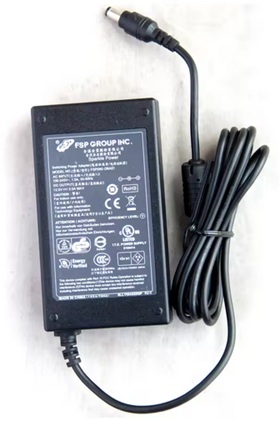
Product Details
The Charger is also Compatible Part Numbers:
FSP060-DIBAN2,
FSP060-DBAB1,
FSP060-DBAE1,
FSP060-DHAN3,
FSP060-DBCD1
The Adapter is a 60W rated power supply and replaces fsp FSP060-DIBAN2 laptop charger. The Replacement AC Adapter is designed to be 100% manufacturer compatible and will meet OEM specifications.
- Brand new FSP FSP060-DIBAN2 Adapter
- Original standard designed
- Approved:CE,FCC,RoHS
- Test:Temperature test; Vibration test; Drop-Test;Over charging and discharging test
- Smart device surge protection ,OVP ,OCP ,SCP
- Strong built for heavy duty and long usage performance
- Triple tests before packing ensure the reliable quality
Here are some tips for better maintenance of AC Adapter.
- Always put first the DC output plug into the laptop's power jack before putting the input plug on the power outlet. This is the correct method.
- Switch off the Laptop AC power adapters when you are not using the laptop to prevent overheating.
- Don't shake or knock the adapter. Improper handling may break the internal parts and circuit boards.
- Keep your adapter in a dry place with room temperature. Just like other electronic devices, adapter can get damage cause by high temperature.
- Avoid the metal tip of the adapter from getting in contact with other metal objects because it can cause short-circuiting. Your laptop might get damage when a short-circuited charger is used.
- Never pull the cord to detach the plug from the power outlet because the wire might be slashed or loosened.