Product Details
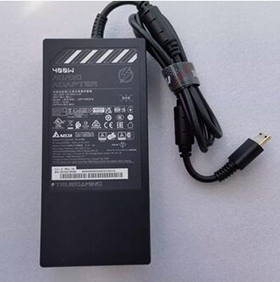
This is a New Rpelacement Chicony A23-400P1A AC Adapter Power Supply for the following notebooks / laptops:
For Msi Raider 18 HX i9-14900HX RTX 4090 Notebook AC Adapter
For MSI Titan 18HX A14VIG-036US RTX4090 Gaming Laptop
See the Label on the bottom of your Laptop to determine which AC Adapter your Laptop uses.
The Chicony A23-400P1A Charger is also Compatible Part Numbers:Delta ADP-400CB B , Chicony A23-400P1A ,
A400A001P
The Adapter is a 400W rated power supply and replaces Chicony A23-400P1A laptop charger. The Replacement AC Adapter is designed to be 100% manufacturer compatible and will meet OEM specifications.
- Brand new Chicony A23-400P1A Adapter
- Original standard designed
- Approved:CE,FCC,RoHS
- Test:Temperature test; Vibration test; Drop-Test;Over charging and discharging test
- Smart device surge protection ,OVP ,OCP ,SCP
- Strong built for heavy duty and long usage performance
- Triple tests before packing ensure the reliable quality
Here are some tips for better maintenance of AC Adapter.
- Always put first the DC output plug into the laptop's power jack before putting the input plug on the power outlet. This is the correct method.
- Switch off the Laptop AC power adapters when you are not using the laptop to prevent overheating.
- Don't shake or knock the adapter. Improper handling may break the internal parts and circuit boards.
- Keep your adapter in a dry place with room temperature. Just like other electronic devices, adapter can get damage cause by high temperature.
- Avoid the metal tip of the adapter from getting in contact with other metal objects because it can cause short-circuiting. Your laptop might get damage when a short-circuited charger is used.
- Never pull the cord to detach the plug from the power outlet because the wire might be slashed or loosened.