

replacement laptop batteries
replacement laptop batteries
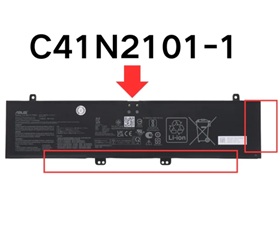

Brand new C41N2101-1 Laptop Battery for Asus G14 2022 GA402RJ.For Asus C41N2101-1 Battery is a high-quality replacement for your original battery, which meets all technical requirements for reliability and security. All laptop batteries have passed FCC, CE and Rohs safety certifications.Each battery is individually tested before shipment and backed by 60 day complete satisfaction guarantee and a 1 Year warranty.
Our Laptop Batteries offers a wide range of Li-ion quality laptop batteries that are FCC, RoHS and CE certified.Brand New Asus Battery For C41N2101-1, ensures fast charging and low power consumption, Built-in circuit protection ensures both safety and stability.
Compatible Part Number:
C41N2101-1, 4ICP4/59/122.
Guaranteed to work on the following model:
ZenBook Pro 14 DUO OLED UX8402VU-P1028W
ZenBook Pro 14 DUO OLED UX8402VV-DS91T-CA
ZenBook Pro 14 DUO OLED UX8402ZA
ZenBook Pro 14 DUO OLED UX8402ZA-M3059W
ZenBook Pro 14 DUO OLED UX8402ZA-M3072W
ZenBook Pro 14 DUO OLED UX8402ZA-M3088W
ZenBook Pro 14 DUO OLED UX8402ZA-M3121W
ZenBook Pro 14 DUO OLED UX8402ZA-M3123W
ZenBook Pro 14 DUO OLED UX8402ZE-DB74T
ZenBook Pro 14 DUO OLED UX8402ZE-M3022W
ZenBook Pro 14 DUO OLED UX8402ZE-M3050W
ZenBook Pro 14 DUO OLED UX8402ZE-M3134W
ZenBook Pro 14 DUO OLED UX8402ZE-M3167X
ZenBook Pro 14 DUO OLED UX8402ZE-OLED-M
ZenBook Pro 14 OLED UX6404VV
ZenBook UM6702RA-M1036W
ZenBook UM6702RA-M2014W
ZenBook UM6702RA-M2111W
ZenBook UM6702RC-DS74T
ZenBook UM6702RC-M2154W
Note: This battery comes in two versions: C41N2101 and C41N2101-1, which can be easily confused. Please make sure to check before purchasing.
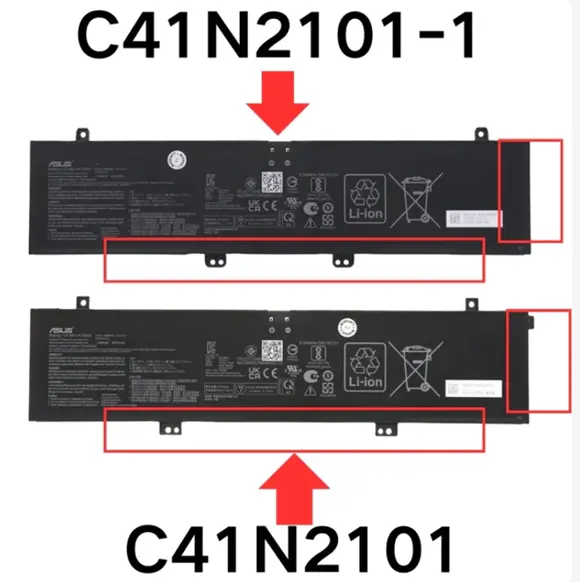
This Asus C41N2101-1 15.48V 76Wh Battery was made in accordance with original battery specifications, Certified by international standards, this battery offers a reliable and high-quality replacement option. Buy with confidence knowing that you're getting a product that will keep your device running smoothly.
1.Firstly, turn off the laptop. Be sure that the laptop is not connected to a charging slot and is shut down before you start.
2.Secondly, disconnect the connection that is between the motherboard and the old battery. This will ensure that there is no accident during disassembly.
3.Next, remove the battery first. Unscrew it very slowly and cautiously.
4.Lastly, connect the new Asus C41N2101-1 Laptop Battery carefully to the motherboard.
©2012-2025. www.laptopadaptershop.com.au All offers and prices are subject to change without prior notice.Designated trademarks and brands are the property of their respective owners.