Product Details
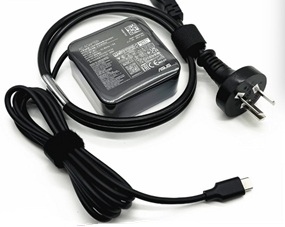
This is a New Rpelacement Asus AD10380 AC Adapter Power Supply for the following ASUS notebooks / laptops:
Asus ZenBook S UX391FA , Asus ROG Zephyrus Duo 15 GX550LXS , Asus ROG Zephyrus G14 GA401IH , Asus ROG Zephyrus S17 GX701LXS , Asus ROG Zephyrus Duo 15 GX550LWS , Asus ZenBook 13 UX325UA , Asus ZenBook 14 UX425UAZ , Asus ExpertBook B5 B5402CEA , Asus ExpertBook B5 Flip B5402FEA , Asus VivoBook 13 Slate T3300KA
See the Label on the bottom of your Laptop to determine which AC Adapter your Laptop uses.
The Asus AD10380 Charger is also Compatible Part Numbers:
AD10380
The Adapter is a 65W rated power supply and replaces asus AD10380 laptop charger. Designed to meet Asus's original specifications. The Replacement Asus AC Adapter is designed to be 100% manufacturer compatible and will meet OEM specifications.
- Brand new Asus AD10380 Adapter
- Original standard designed
- Approved:CE,FCC,RoHS
- Test:Temperature test; Vibration test; Drop-Test;Over charging and discharging test
- Smart device surge protection ,OVP ,OCP ,SCP
- Strong built for heavy duty and long usage performance
- Triple tests before packing ensure the reliable quality
Here are some tips for better maintenance of AC Adapter.
- Always put first the DC output plug into the laptop's power jack before putting the input plug on the power outlet. This is the correct method.
- Switch off the Laptop AC power adapters when you are not using the laptop to prevent overheating.
- Don't shake or knock the adapter. Improper handling may break the internal parts and circuit boards.
- Keep your adapter in a dry place with room temperature. Just like other electronic devices, adapter can get damage cause by high temperature.
- Avoid the metal tip of the adapter from getting in contact with other metal objects because it can cause short-circuiting. Your laptop might get damage when a short-circuited charger is used.
- Never pull the cord to detach the plug from the power outlet because the wire might be slashed or loosened.